 Excel
FSM
Real-Time
Excel
FSM
Real-Time
The Ultimate Financial Report Generator
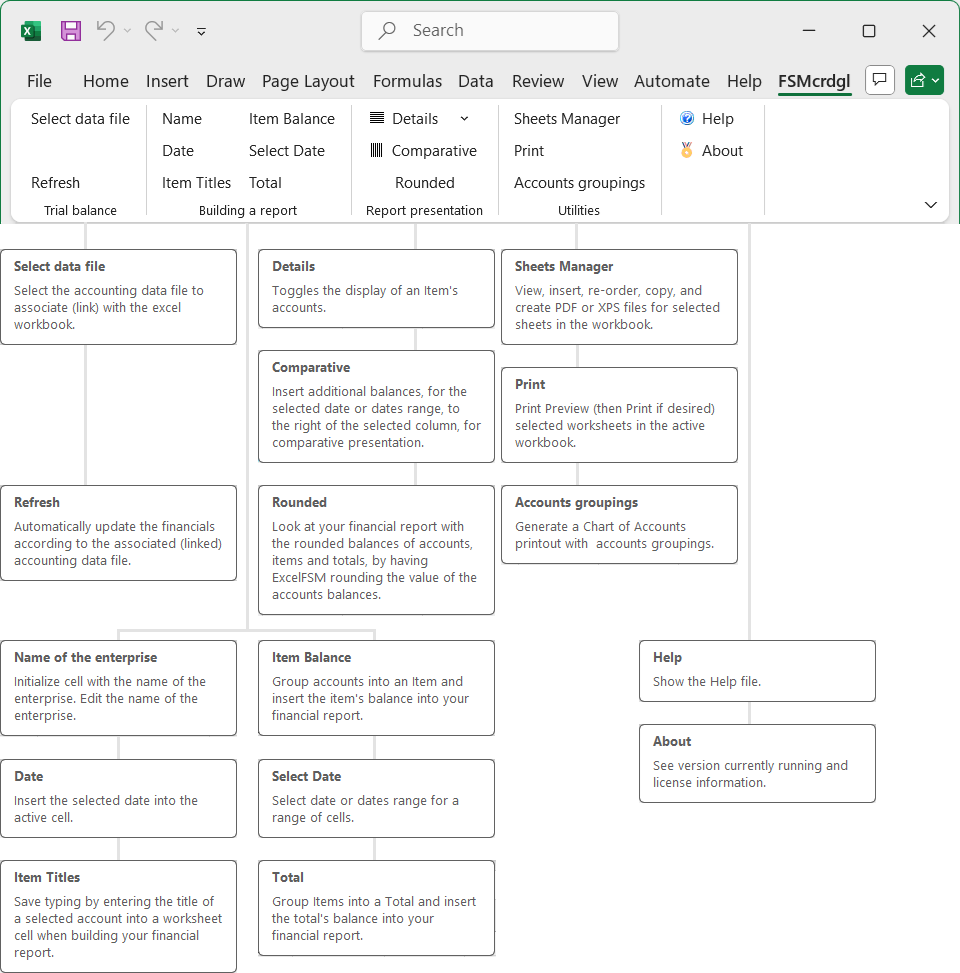
- you select the FSM - Cash Receipts/Disbursements General Ledger data file to associate (link) to an excel workbook,
- you build your financial reports using the FSM buttons,
- you select the date, or date ranges, to show the balances according to the selected dates,
and after any changes made in the accounting,
- you simply click the Refresh button and your financial reports are automatically updated.
 Help file:
html
pdf
ExcelFSMqbo
- ExcelFSM Real-Time for QuickBooks Online
Help file:
html
pdf
ExcelFSMqbo
- ExcelFSM Real-Time for QuickBooks Online1- Creating an ExcelFSM QuickBooks Online Company File
2- Getting started
 MP4
Help file:
html
pdf
MP4
Help file:
html
pdf
With ExcelFSM Real-Time, your custom reports are automatically updated by clicking the Refresh button, and
you can select any date or date range within a fiscal year,
MP4
System requirements:
Microsoft Excel 2007 or later.
a computer running Microsoft Windows XP or later;
.NET 4.0
.NET 4.6.1 for QuickBooks Online
