After installing ExcelFSM Real-Time for JAQONO, an FSM ribbon is added into your Excel:
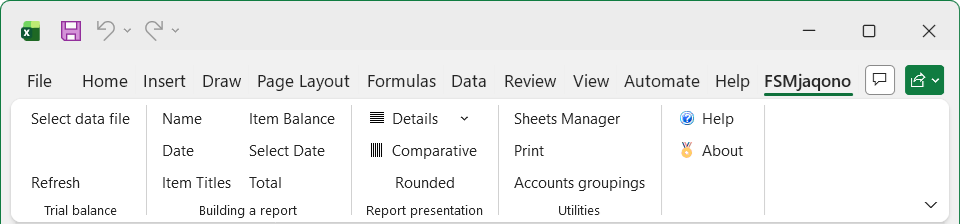
The FSM ribbon contains buttons, separated into groups ordered from left-to-right reflecting the actions you will do to prepare financial reports.
•Trial Balance - Select the accounting data file to associate (link) with the excel workbook and automatically update the financials according to the associated (linked) accounting data file.
•Building a report - Build your financial report by filling Excel cells with the Name of the enterprise, the Date, Titles, Items, for which you can select the date or dates range within a fiscal year, and Totals.
•Report Presentation - Extend the presentation of your financial report by toggling various views on and off, including Details (the individual accounts grouped into an Item) and Rounded (with computation being performed with the rounded values). Display Item and Total balances from other dates for side‑by‑side comparison.
•Sheets Manager - Travel through the sheets to insert, delete, move and copy sheets, and to create PDF or XPS files for selected sheets.
•Print - Easily select and print the various worksheets containing the financial reports.
•Accounts groupings - Generate a chart of accounts printout with accounts groupings.
•Help - Get Help on ExcelFSM (what you are reading now).
•About - See version currently running and license information.
See the following sections to learn about the buttons of each of these groups.